
Avoid Accidental Changes on Standby Big-IP
Overview
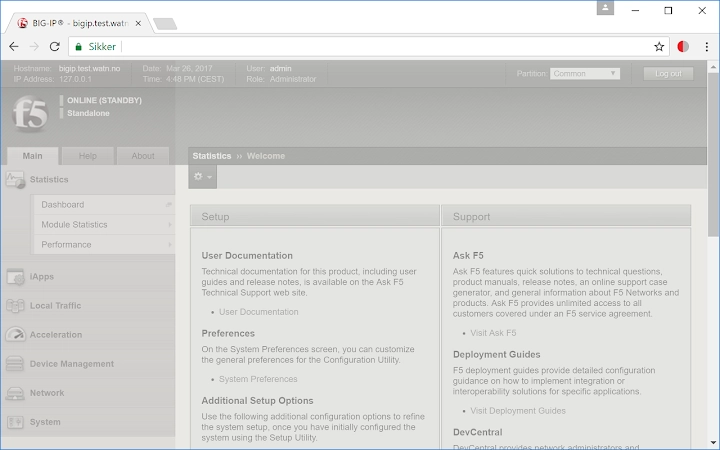
The software is a browser extension designed to prevent accidental configuration changes on standby Big-IP devices. It activates when a user logs into a standby node, visually altering the interface by applying a greyed-out, unappealing appearance to the web UI. This visual cue serves as a clear warning that the system is not the active node and should not be modified. The tool is particularly useful for IT administrators and network security professionals who manage F5 Big-IP systems, where incorrect changes on standby nodes can lead to configuration drift or operational risks. The extension is inspired by the "Ugly HTTP" concept, emphasizing usability through visual disruption. It is intended for use in enterprise environments where precision and system integrity are critical. The developer did not provide additional system requirements or real-world deployment statistics. Platform compatibility is confirmed for Windows, Mac, and Linux, but exact integration details with various browsers were not specified.
Key Features & Capabilities
- Standby Node Detection – Automatically identifies when a user is accessing a standby Big-IP instance through the web interface.
- Visual Warning System – Transforms the web UI into a grey, unattractive layout to discourage changes.
- Temporary Disable Option – Allows users to temporarily deactivate the extension when intentional configuration changes are required on a standby node.
- Browser-Based Deployment – Functions directly within web browsers without requiring system-level installation.
- Lightweight Design – With a file size of 2.5 MB, the extension imposes minimal overhead on browser performance.
Each feature is designed to support safe operational practices in network infrastructure management. For example, when an IT administrator logs into a standby Big-IP during troubleshooting, the visual change immediately signals that the system is inactive. This reduces the risk of accidental edits that could disrupt failover readiness. The temporary disable function ensures flexibility during planned maintenance or diagnostics. The extension does not alter system behavior beyond the browser layer, relying solely on visual feedback to guide user decisions. It integrates seamlessly with existing workflows without requiring additional configuration steps.
User Interface, Workflow & Performance
The extension operates entirely within the browser environment, modifying the appearance of the Big-IP web interface without affecting underlying system functions. The UI change is immediate upon detection of a standby node, transforming the page into a monochrome, visually unappealing state. Navigation remains functional, but the design discourages interaction. Users can still view configuration data, monitor system status, and access logs, but the interface's appearance signals that modifications are discouraged. The workflow is passive—no prompts, no confirmations—relying on visual cues to influence behavior. The developer did not specify resource usage details, but the 2.5 MB file size suggests low memory and CPU impact. Performance observations are based on general software behavior patterns. Stability is expected to be high, given the extension’s minimal scope and reliance on standard browser APIs. No crashes, freezes, or compatibility issues were reported in the provided data.
Compatibility & System Requirements
The extension is compatible with Windows, Mac, and Linux operating systems. It functions as a browser add-on, meaning compatibility depends on the browser’s support for extensions. The software version is 1.0, and the installation size is 2.5 MB. The developer did not specify exact system requirements or browser versions. Compatibility information was partially provided. No hardware requirements were listed. The extension does not require administrative privileges for installation, as it operates at the browser level. It is designed to work across multiple devices and environments, making it suitable for distributed IT teams. Users should ensure their browser supports extension management and has JavaScript enabled for full functionality.
Pros and Cons
Pros
- Clear visual warning reduces risk of accidental configuration changes
- Simple, lightweight design with minimal system impact
- Temporary disable feature allows for controlled exceptions
- Free to use with no licensing restrictions
- Works across Windows, Mac, and Linux platforms
Cons
- No advanced customization options for the warning appearance
- Relies solely on visual feedback, which may be ignored by experienced users
- Exact browser compatibility details were not provided
- Does not prevent changes—only warns against them
- No integration with logging or audit trails
FAQ Section
Is this extension compatible with all web browsers?
Compatibility depends on the browser’s support for extensions. The extension is confirmed to work on Windows, Mac, and Linux, but specific browser versions were not listed.
Can I use this extension offline?
Yes, once installed, the extension functions without an internet connection, as it operates locally within the browser.
Is the extension safe to install?
Yes, the extension is developed by F5 Networks, a trusted name in network security. It does not collect user data or transmit information outside the browser.
How do I disable the warning temporarily?
The extension includes a temporary disable option, accessible through its browser menu, allowing users to bypass the visual warning when making intentional changes to a standby node.
Does this tool require a license?
No. The software is free and does not require a license key or subscription for use.
Final Thoughts
This browser extension delivers a focused, effective solution for IT administrators managing F5 Big-IP systems. By leveraging visual disruption to prevent accidental changes on standby nodes, it addresses a common operational risk with minimal overhead. Its simplicity, cross-platform support, and free availability make it a valuable tool for network security teams. While it does not enforce changes, its passive warning mechanism is sufficient for most use cases. The lack of customization and advanced features is offset by its reliability and ease of use. For IT professionals who prioritize system integrity and operational safety, this tool offers a practical safeguard. Download Avoid Accidental Changes on Standby Big-IP now.







